Monthly budget vs actual by category
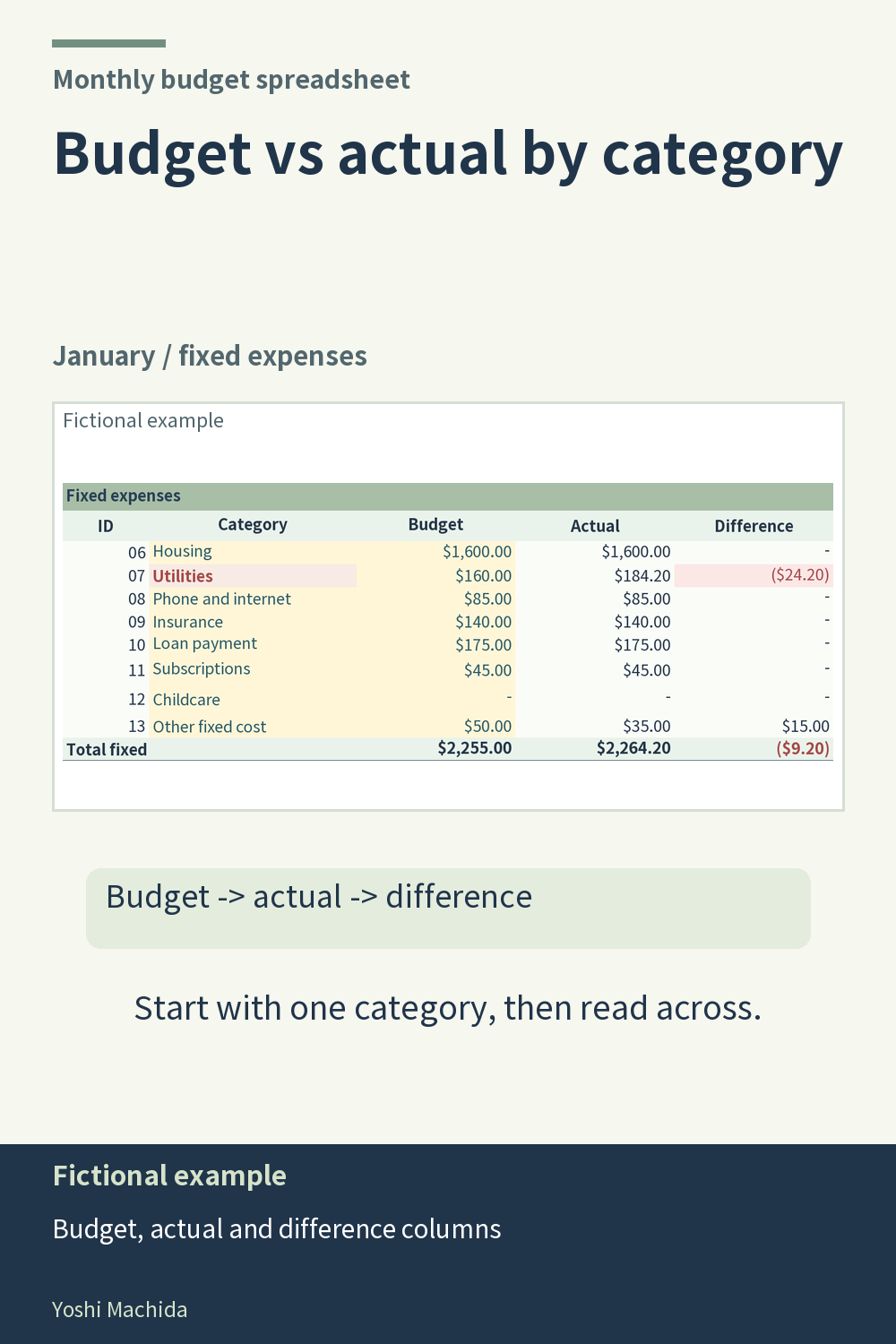
A category table answers a more specific question than a single monthly total: which recorded amounts differ from the plan? In this view, each fixed expense category has a budget column, an actual column and a difference column. Read across one row before comparing several categories. Sample figures are fictional.
Start with the category label, then read its planned amount and recorded amount as a pair. In the planner, actual amounts come from transactions entered on the month's tab. If a row looks unexpected, return to that month's records and check the category codes and amounts. A total can be arithmetically correct while including an entry assigned to the wrong category.
Next, read the difference alongside those two amounts. Confirm which amount is above the other before writing a note about the gap. The difference is a calculated comparison, not a separate transaction. Do not change a calculated difference to make it look right.
In any budget table, keep the column headings visible while reading a row. Compare like with like: the same category, the same month and the same stage of record keeping. This small reading habit prevents a partial month's actual figure from being mistaken for a completed month.