Monthly budget spreadsheet: read budget vs actual charts
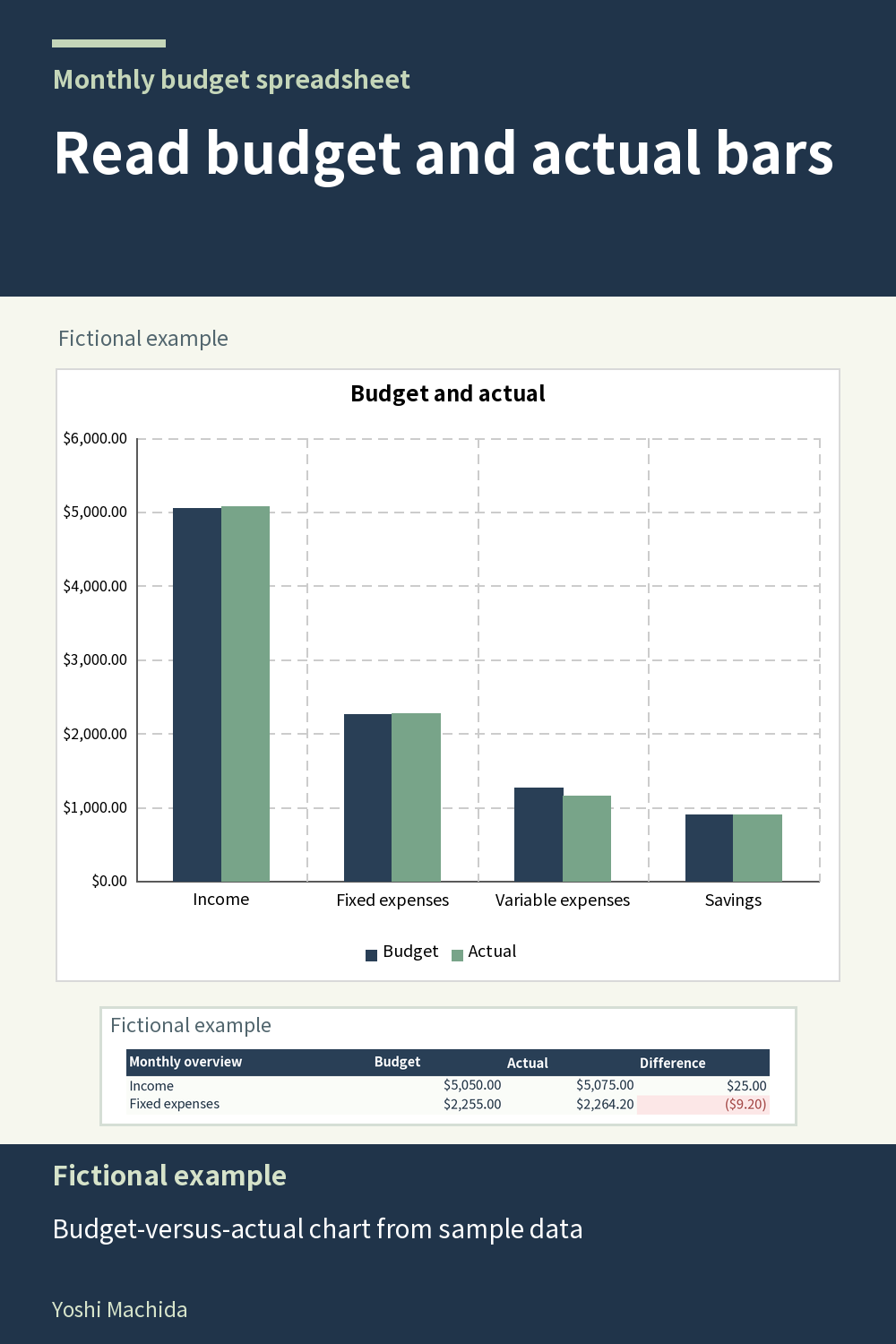
Two bars are useful only after you know what they represent. In this monthly chart, the legend separates budget from actual amounts. The image is drawn from the sample workbook's chart data, rather than from a different set of promotional numbers. Sample figures are fictional.
Start with one labeled group and identify its budget bar and actual bar. Compare their lengths using the same scale. Then read the corresponding amounts in the monthly table. The chart gives a quick visual comparison, while the table gives the recorded figures and their calculated difference.
Keep the meaning of the group in view. Income, expenses and savings are separate types of activity, even when displayed on the same chart. Savings entries in this planner are allocations away from the available budget, not investment growth. A tall savings bar therefore describes recorded allocations, not a return on an investment.
Use a chart as a starting point for a question, such as which group has the widest gap between plan and record. Follow that question back to the table and, if necessary, the transaction log. This reading sequence is helpful in any chart paired with a data table. Check that your month's records are complete before comparing the chart with another completed month, and avoid replacing a table check with a visual impression alone.